Comparisons & Guides · For everyone
Stockpile Measurement Apps for iPhone in 2026: SR Measure, StockAce, Polycam, LidarCad and Stockpile Scan Compared
Six apps will measure a pile with an iPhone. They differ in how they capture it, where they process it, what they charge and what they hand back. Here is what each does and which fits which job.
In short
- Two apps are built for stockpiles from the ground up: SR Measure (photos, free tier, paid plans from $20 a month) and StockAce (augmented reality, free to 3 m³, $49.99 a month above that).
- Polycam and Scaniverse are general 3D scanners. They capture a pile well but leave the volume to you, usually by exporting to CloudCompare.
- LidarCad is a $17.99 CAD app with LiDAR cut-and-fill volumes that was last updated in 2022.
- Stockpile Scan, made by Laan Labs, is free with no account, processes photos on the phone, works with or without LiDAR and shows every volume with a ± range.
Laan Labs, which publishes this site, makes Stockpile Scan. Everything below about the other apps comes from their App Store listings and websites as of October 2026, linked so you can check.
What to look for in a stockpile measurement app
Seven questions sort the field. How does it capture the pile: photos, LiDAR or an augmented-reality trace? Is the model built on the phone or a server? How does it get scale? Does it need LiDAR? Is there a pile-size limit? What comes out: a volume alone, or a ± range, tons, a report and exports? And what does it cost, including the account and what happens to your photos. The photogrammetry vs LiDAR explainer covers why capture method matters.
SR Measure (Stockpile Reports)
SR Measure is the phone stockpile app with the longest history. Its 2013 predecessor had users set two orange cones 25 feet apart for scale, walk the pile recording video and upload for cloud processing; Pit & Quarry covered it, and the Texas Department of Transportation tested it against LiDAR and GPS surveys, finding about ±1.5% on piles under 100 cubic yards. Today’s App Store listing describes capturing the pile with the phone and getting volume and tonnage with a surface confidence score and, for open-based piles, a toe score. It handles freestanding piles, bunkers and piles against a wall with no stated size limit, on iPhone (iOS 18.4 or later) and Android.
The App Store listing shows Professional at $20 a month or $200 a year and Business tiers for 10, 20 and 50 users at $100, $200 and $500 a month; the company’s FAQ matches, while its pricing page lists Professional at $99 a month and Business at $500, so confirm with the vendor. Business plans add a web application; the wider platform offers fixed cameras and drone measurement.
StockAce (ITS Geo Solutions)
StockAce uses augmented reality rather than photogrammetry. Its App Store listing says it scans stockpiles, pits, trenches and underground rooms and calculates volume and mass, with all processing on the device and no network needed; because it does not rely on GNSS it is pitched at indoor and underground mining as much as yards. Features include toe-point polygons, a reference surface, bunker and silo piles, reports, and PDF, E57 and CSV exports.
The free version is limited to 3 m³ (106 ft³) and leaves out CSV and E57 exports; Professional is $49.99 a month or $399.99 a year. It needs iOS 16.6 or later and also runs on iPad and Vision Pro.
Polycam and Scaniverse
Both are excellent general-purpose 3D scanners; neither is a stockpile app. Polycam captures with LiDAR or photogrammetry on iOS, Android and Vision Pro. Its free plan allows limited captures, Basic is $150 a year or $30 a month, and Business is $400 a year per user; measuring tools are listed, volume is not. Scaniverse, from Niantic Spatial, builds meshes and Gaussian splats on the device on iOS and Android and exports standard 3D formats; its product page lists no measurement tools.
To get a volume from either, export the scan to CloudCompare, which is free and has a 2.5D volume tool. A 2026 ISPRS study did exactly that with an iPhone 12 Pro Max, getting 0.56–1.88% error on regular lab-scale piles and 4.45% on an irregular one. But it is a desktop workflow with no toe detection or report, and LiDAR’s 10–15 ft range means a tall pile’s top may never be captured.
LidarCad
LidarCad is a $17.99 CAD editor (price varies by region) that adds LiDAR scanning on devices that have the sensor, with cut-and-fill volume against a base plane or a drawn boundary, point-cloud capture, length and area measurement, and DWG/DXF support. Two caveats: scanning needs a LiDAR iPhone or iPad, and the last listed update is version 1.9.10 from August 2022.
Stockpile Scan (Laan Labs)
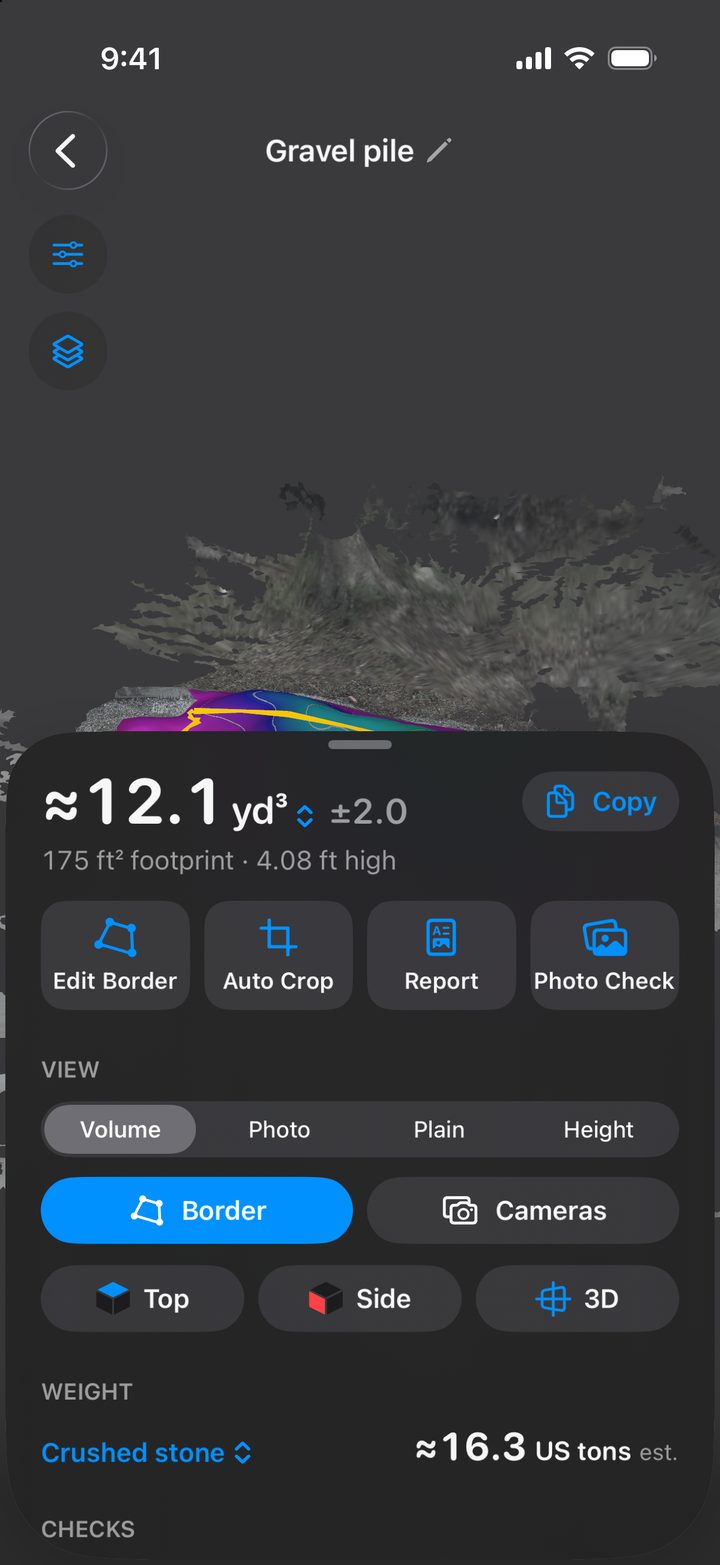
Stockpile Scan is our app, so this is a description, not a review. It is free, with no ads, subscriptions, in-app purchases or account. You walk once around the pile while a guide ring fills in; the photos are turned into a 3D surface on the phone and never uploaded. The result is a volume in cubic yards, meters or feet with a ± range worked out from that scan and plain-language checks, such as a walk that did not close the loop. You can drag the border, pick a material or enter a density for a weight in US or metric tons, see the measured shape over your own photos in Photo Check, and share a PDF report with a plan view, elevations and a site map.
It works on any iPhone running iOS 18 or later; on Pro models, LiDAR sets the scale and narrows the ± range but is not required. Exports cover OBJ, USDZ, GLB, STL, FBX, PLY, LAS, E57 and KMZ. Its limits are those of any ground-level capture: a very tall pile hides its top from someone at the toe, a pile against a wall cannot be fully circled, and it is iPhone-only.
Side by side
| App | Capture | Processing | LiDAR | Free | Paid | Outputs | Platforms |
|---|---|---|---|---|---|---|---|
| SR Measure | Photos while walking | App and web platform | Not required | Free tier | From $20/mo; pricing page differs | Volume, tonnage, confidence and toe scores | iPhone (iOS 18.4+), Android |
| StockAce | Augmented reality trace | On device | Not stated | Up to 3 m³ | $49.99/mo or $399.99/yr | Volume, mass, PDF, E57 and CSV (paid) | iPhone, iPad, Vision Pro |
| Polycam | LiDAR or photos | App and cloud | Optional | Limited captures | $150/yr Basic; $400/yr Business | Mesh exports, length and area; no volume listed | iPhone, Android, Vision Pro |
| Scaniverse | LiDAR or photos | On device | Optional | Not published | Not published | Mesh and splat exports; no measurement listed | iPhone, Android |
| LidarCad | LiDAR | On device | Required to scan | No | $17.99 once | Cut-and-fill volume, DWG/DXF | iPhone, iPad (iOS 14+) |
| Stockpile Scan | Photos while walking | On device | Optional; narrows the ± range | Everything | None | Volume with ± range, tons, Photo Check, PDF, 9 exports | iPhone (iOS 18+) |
From each app’s App Store listing or website, October 2026. Prices in US dollars; check the listing for your region.
Which app for which job
- A homeowner checking a delivery: Stockpile Scan for any pile, or StockAce if it is under 3 m³.
- A yard or small quarry doing monthly counts: Stockpile Scan for a free workflow with reports and exports, or SR Measure Professional for its web platform and pile history.
- A multi-site operator wanting dashboards, cameras and drones in one place: SR Measure’s Business or Enterprise tiers.
- Underground or indoor mining with CSV exports: StockAce.
- Someone already in CAD or general 3D capture: LidarCad, or Polycam plus CloudCompare.
The accuracy caveat for all of them
Phone photogrammetry has a published track record: TxDOT’s ±1.5% on small piles, the vendor’s ±2% on large ones, and the ISPRS LiDAR results above. None of it transfers automatically to your pile. Field accuracy depends on walking the whole loop with the pile in frame, on what the app assumes about the ground under the pile, and on the density you convert with, which is why how accurate a stockpile measurement really is spends more time on the base and the density than on the scanner. Whatever app you choose, measure a delivery that came with a scale ticket and compare. An app that shows a ± range is telling you something the rest leave out.
Frequently asked questions
Is there a free stockpile measurement app?
Yes. Stockpile Scan is free with no in-app purchases or account. SR Measure has a free tier, with paid plans for unlimited measurements starting at $20 a month on its App Store listing. StockAce is free for piles up to 3 cubic meters (106 cubic feet) and charges $49.99 a month above that. Polycam’s free plan is limited and does not list volume measurement.
Do I need an iPhone with LiDAR to measure a stockpile?
No. SR Measure and Stockpile Scan work from photos on any supported iPhone, and Stockpile Scan uses LiDAR only when the phone has it, to set scale and narrow the ± range. LidarCad does need a LiDAR model. Be aware that iPhone LiDAR reaches only 10 to 15 feet, which is why apps built on it alone struggle with tall piles.
Is there a stockpile measurement app for Android?
SR Measure has an Android version. Polycam and Scaniverse run on Android too but are general 3D scanners rather than pile apps. StockAce, LidarCad and Stockpile Scan are Apple-only.
How accurate are phone stockpile measurement apps?
In the Texas Department of Transportation’s 2013 tests, a phone video app came within about 1.5 percent of LiDAR and GPS surveys on piles under 100 cubic yards, and its maker claimed 2 percent on larger ones. A 2026 ISPRS study found iPhone LiDAR within 0.56 to 1.88 percent on regular lab-scale piles and 4.45 percent on an irregular one. In the field, accuracy depends on walking the full loop, the base under the pile and the density you convert with. Prefer an app that shows a ± range, and test any app on a pile with a scale ticket.
Try the free one first
Stockpile Scan is free, with no ads, subscriptions or account. Walk around a pile and get its volume, a ± range, a weight estimate and a PDF report, all on the phone.
Any iPhone with iOS 18 or later. LiDAR optional. Learn more about the app.
Related articles
Sources and further reading
- App Store: SR Measure – Stockpile Volume (pricing and requirements)
- Stockpile Reports: Plans and Pricing
- Stockpile Reports: Stockpile Measurement FAQ
- App Store: StockAce (pricing, free limit and requirements)
- Polycam: plans and pricing
- Niantic Spatial: Scaniverse capture product page
- App Store: LidarCad
- ENR: TxDOT proves accuracy of stockpile volume measurement app
- Pit & Quarry: app opens door for digital stockpile measurements (2013)
- ISPRS Archives: iPhone LiDAR for stockpile volume estimation
- CloudCompare: free point-cloud software with a volume tool